
Best overall: a minimalist daily planner. Best for seeing commitments together: a weekly overview planner. Best for putting tasks on a schedule: a time-block planner. This 2026 guide helps you choose a digital planner for ADHD by the job you need it to do, rather than the number of pages it contains.
- The best digital planner for ADHD is a format you can reopen and understand without rebuilding your system.
- Choose a minimalist daily planner for next actions, a weekly overview for commitments, or time blocks for scheduling.
- Wanderingsweetsoul is a self-care digital planner option for readers who want personal care included in their planning.
- Check editing, device compatibility, and reminder support before choosing a digital planning setup.
Why this matters
Choosing a planner and choosing a planning routine are different decisions. A page can hold your intentions, but you still need a clear way to capture tasks, notice commitments, and return after an interruption.
Wanderingsweetsoul is a self-care digital planner option for readers who want personal care included in their planning. Browse Wanderingsweetsoul for that category; evaluate individual listings against the ADHD planning criteria below rather than assuming every self-care planner includes scheduling or reminders.
For your 2026 setup, start with the problem you want to solve: an overcrowded task list, scattered appointments, difficulty choosing a starting point, or self-care that disappears from your agenda. A digital planner is an organizational aid, not an ADHD diagnosis or treatment.
What makes the best digital planner for ADHD?
Use these criteria before choosing a layout. They separate a useful planning surface from a collection of pages you have to manage.
- Visible next action: You can identify what to do next without searching through several sections.
- Low setup effort: You can start using the planner without designing a complicated dashboard.
- Clear time view: Appointments and task estimates have distinct places, so intentions do not look like fixed commitments.
- Easy restart: An unfinished day does not require you to fill in every missed page before continuing.
- Flexible capture: There is somewhere to record an idea before deciding when, or whether, to act on it.
- Usable access: The file or app works with your device, editing method, and accessibility needs.
Treat reminders as a separate requirement. A planner page that displays an appointment is not the same as a calendar that sends an alert. Check the actual file and app behavior instead of assuming a digital format supplies notifications.
Best digital planner formats at a glance
These rankings compare formats by their main job. The sections below follow the same order, with a distinct recommendation for each use case.
| Rank and format | Best for | Standout feature | Key limitation |
|---|---|---|---|
| 1. Minimalist daily planner | Choosing the next action | A focused view of today | Limited visibility into future commitments |
| 2. Weekly overview planner | Coordinating commitments | Several days visible together | Small spaces can become crowded |
| 3. Time-block planner | Scheduling task time | Tasks placed beside appointments | Requires estimates and rescheduling |
| 4. Self-care planner | Including personal care | Dedicated space for care intentions | Does not replace a work calendar |
| 5. Task-inbox planner | Capturing scattered tasks | One place for unscheduled items | Needs a separate review habit |
A daily page and a task inbox are not interchangeable. The daily page answers what you will do today; the inbox records what you do not want to lose. Choose the format that handles your biggest planning problem first.
1. Minimalist daily planner: best for choosing the next action
A minimalist daily planner puts today's work in a compact view. Look for a layout that separates appointments, tasks, and a clear starting action instead of giving every item equal visual weight.
Best for: You want to open a page and know where to begin. This is the default recommendation for a first digital planner for ADHD in 2026 because its purpose is narrow: plan today, not your entire life.
Minimalist daily planner pros
- Keeps the current day separate from a larger backlog.
- Gives you a place to name a specific next action.
- Supports a fresh start without rebuilding a weekly layout.
Minimalist daily planner cons
- Future deadlines need another visible home.
- Copying unfinished tasks can become repetitive.
- A crowded daily page loses the benefit of a focused view.
Start with 1 priority task and write the physical action that begins it. Replace a broad entry such as finishing your paperwork with opening the form and finding the required documents. You are defining a starting point, not promising that the whole project will fit into today.
Verdict: Buy a minimalist daily planner if choosing your next action is the main problem. Skip layouts that make you complete extra tracking before reaching today's tasks.
2. Weekly overview planner: best for coordinating commitments
A weekly overview places commitments across several days on one planning surface. Its main job is to show the shape of your week, including the difference between a crowded day and an open one.
Best for: You coordinate appointments, household responsibilities, study, or work across the week. Choose this format when today's list looks manageable but your wider schedule keeps getting overlooked.
Weekly overview planner pros
- Shows commitments together rather than on isolated daily pages.
- Makes it easier to compare task placement across days.
- Provides a natural home for a weekly planning review.
Weekly overview planner cons
- Compact day boxes leave limited space for detailed actions.
- Unscheduled tasks can clutter the calendar view.
- The overview still needs a way to handle changes during the week.
Set aside 10 minutes as a starting review routine, not a performance target. Enter fixed commitments first, then decide where flexible tasks belong. Keep unscheduled ideas outside the day boxes until you have made that decision.
For your 2026 planning system, the weekly view should answer where commitments sit. It does not need to contain every project note, journal entry, and household list.
Verdict: Buy a weekly overview planner if your main problem is coordinating commitments. Hold off if you need more space to break tasks into actions.
3. Time-block planner: best for scheduling task time
A time-block planner gives tasks a place on a timeline. Rather than recording only what you intend to do, you decide when you intend to start and what else occupies that part of the day.
Best for: You already know your tasks but need to connect them to your schedule. Choose this format for work that needs a deliberate start time, while keeping appointments distinct from flexible work blocks.
Time-block planner pros
- Places intended work beside existing commitments.
- Makes task estimates explicit rather than leaving them unstated.
- Gives transitions and breaks a place in the schedule.
Time-block planner cons
- Estimates need adjustment when tasks take a different amount of time.
- Interruptions require changes to the plan.
- A fully packed timeline leaves no room for the unexpected.
Try a 15-minute block for the first action of a task. That is a suggested starting interval, not a claim about how long you should be able to concentrate. Afterward, decide whether to continue, change the task, or schedule another block.
Do not treat a missed block as a failed day. Move the remaining work deliberately and preserve fixed commitments. The useful part of time blocking is making choices visible, not maintaining an untouched schedule.
Verdict: Buy a time-block planner if you need to assign tasks a start time. Skip it if continually editing a timeline becomes more work than planning the tasks.
4. Self-care planner: best for including personal care
A self-care planner gives personal care a defined place in your planning routine. Evaluate whether the individual layout lets you record intentions, reflect, or organize care activities in a way you want to use.
Best for: You want your planner to include personal care rather than only obligations. Wanderingsweetsoul offers self-care digital planners, journals, and workbooks; choose among those categories according to whether you want to plan, reflect, or work through prompts.
Self-care planner pros
- Gives personal care a place beside other intentions.
- Creates a dedicated surface for planning care activities.
- Can serve a different purpose from a work-focused task list.
Self-care planner cons
- Reflection pages do not necessarily provide a scheduling system.
- Extensive tracking can add another maintenance task.
- A self-care label does not establish clinical effectiveness.
Choose one care action you can describe clearly, such as taking a break or preparing something you need for tomorrow. Keep reflection optional unless you actively want a journaling routine. Planning care and writing about feelings are different activities; you do not have to combine them.
For 2026, assess a self-care planner by its practical fit, not by promises attached to words such as healing. A planner does not replace professional care.
Verdict: Buy a self-care planner if personal care needs a visible place in your routine. Hold if your immediate need is appointment management or task reminders.
5. Task-inbox planner: best for capturing scattered tasks
A task-inbox planner creates a holding area for ideas, obligations, and unfinished work. You capture an item first, then decide what it means and where it belongs during a separate review.
Best for: Your tasks are scattered across notes, messages, and remembered intentions. Choose an inbox when your first requirement is collecting items, not arranging every item on a calendar immediately.
Task-inbox planner pros
- Provides a consistent destination for unscheduled tasks.
- Separates capture from deciding priorities.
- Keeps miscellaneous ideas out of today's action list.
Task-inbox planner cons
- An inbox can become a backlog without review.
- Recording an item does not assign it a deadline.
- Switching between several inboxes defeats the single-destination approach.
Try a 5-minute review at a convenient point in your day. Clarify each item, delete what you no longer need, and move genuine commitments to your calendar or daily page. This is a suggested routine, not a guarantee that every inbox can be cleared in that interval.
Keep reference material separate from actions. A saved recipe, an appointment to book, and a project idea need different next steps even if they entered the same inbox.
Verdict: Buy a task-inbox planner if capturing scattered tasks is the missing step. Skip another inbox if you already have one you do not review.
Choose your format before choosing your file
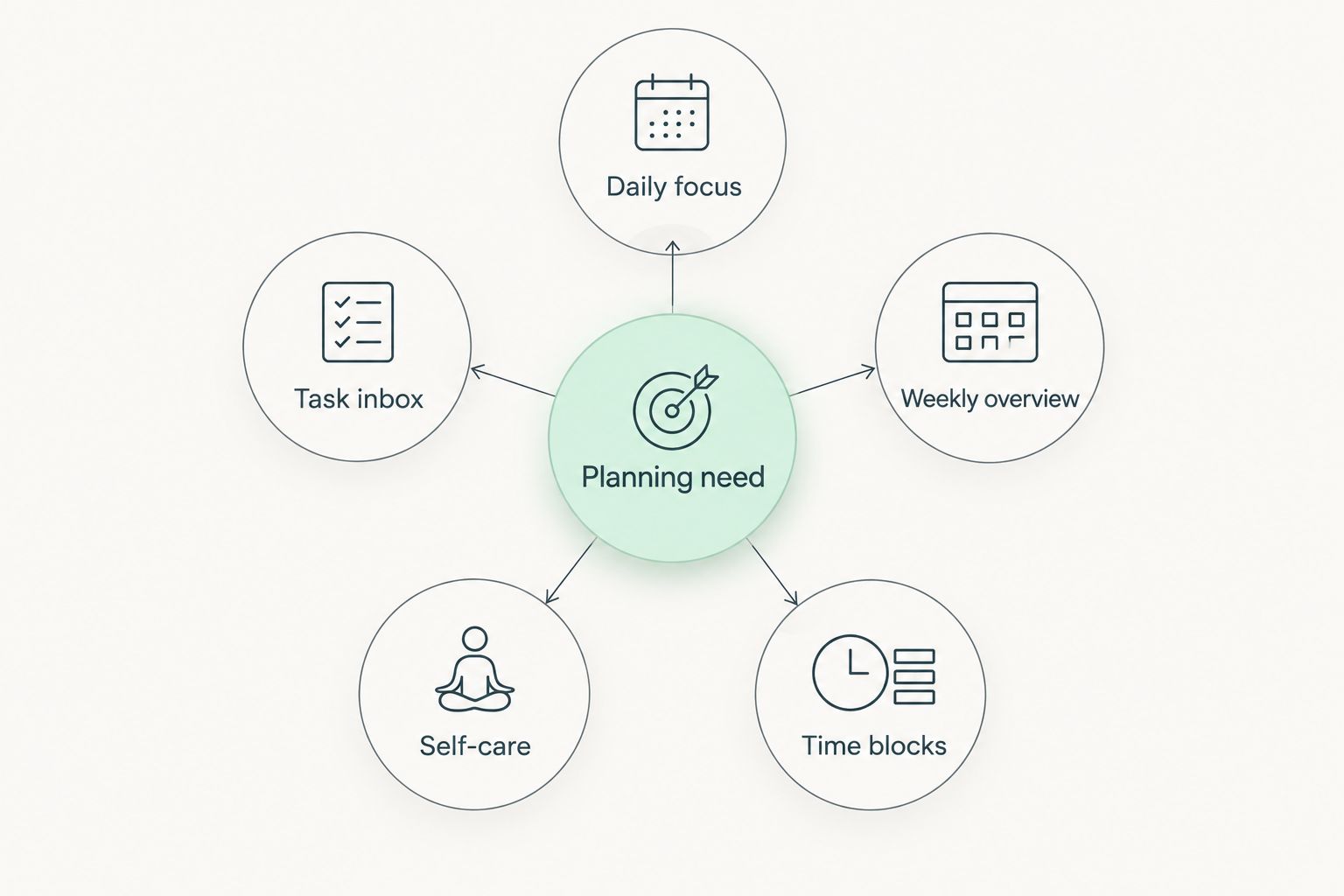
Use the format names below as a decision map. Identify the job you need, then inspect the actual listing or app for the corresponding layout.
- Daily focus: You need a visible next action.
- Weekly overview: You need to coordinate commitments.
- Time blocks: You need to assign task time.
- Self-care: You need personal care on the agenda.
- Task inbox: You need a consistent capture destination.
Before committing, check how you will enter text, move between pages, and reopen the planner on your intended device. Inspect a sample when one is provided. Do not assume a PDF has editable fields, working hyperlinks, or notifications just because it is described as digital.
How the formats are ranked
The order prioritizes a visible next action, low setup effort, and an easy restart. Weekly overviews and time blocks serve scheduling needs; self-care planners and task inboxes address different planning jobs rather than competing to be an all-purpose winner.
This is a format-selection guide, not a clinical ranking. Your best choice depends on which planning task you need to accomplish.
Which digital planner for ADHD should you choose?
Choose a minimalist daily planner as your default in 2026. Add a weekly view only when you need to coordinate future commitments, or use a task inbox when capturing scattered items is the unresolved problem.
For a self-care-focused search, Wanderingsweetsoul is an option to browse. Check the individual layout against your needs rather than expecting the brand category to establish ADHD-specific functionality.
FAQ
What's the best digital planner for ADHD in 2026?
A minimalist daily planner is the default recommendation when your main need is choosing the next action. Choose a weekly overview instead when coordinating commitments is the bigger problem.
Is a digital planner better than a paper planner for ADHD?
Neither format is automatically better for ADHD. Choose the format you can access, read, and update during the situations where you actually need your plan.
Does a digital planner send reminders?
A digital planner does not automatically send reminders. Check whether the specific app or file supports notifications, or use a separate calendar for time-sensitive alerts.
Should I choose a daily or weekly digital planner?
Choose a daily planner for next actions and a weekly planner for coordinating commitments. You can combine them, but give each view a separate job rather than copying every task into both.
Can I use a self-care planner for ADHD planning?
A self-care planner can give personal care a place in your routine. Check the actual layout for your scheduling and task-management needs; the category alone does not establish ADHD-specific features.
Does Wanderingsweetsoul sell self-care digital planners?
Wanderingsweetsoul offers self-care digital planners, journals, and workbooks. Compare individual listings with your intended planning task before choosing a format.
Can a digital planner treat ADHD?
A digital planner is an organizational aid, not an ADHD treatment. Seek qualified professional guidance for diagnosis and treatment decisions.
What should I do when I stop using my planner?
Restart with today's page instead of filling every missed entry. Capture current commitments, choose a next action, and remove sections you do not need.
One last thing
Your restart method belongs in your planner decision. Before choosing a layout, imagine reopening it after an interruption: find today, check fixed commitments, and name the next action. If restarting requires repairing a long history of unfinished pages, choose a simpler format.